Background
A customer had a problem; they wanted a web service that was called by user UserA to run a BizTalk orchestration and at the end of the orchestration another web service would be called and they wanted that to be executed in the context of the caller.

Fig 1: Illustration of problem
Above, the user token is lost when we enter the BizTalk orchestration. BizTalk will call any external services as the BizTalk process account. Setting up Kerberos will not fix this. This problem is not the typical double hop issue.
Workaround with Trusted sub system
This problem can be tacked with the trusted subsystem model. The caller (Biztalk) sets the username in a header and the receiver acts as this user. Note that Biztalk does not call the endpoint using the callers credentials; It merely passes the username as a string. The web services must trust that if they are called from the BizTalk server the user parameter is correct. The web services are using API’s that allow impersonation. The effort to get this working is placed on both BizTalk and the endpoint, we have to pass the username around and we have to act as this user on the receiver.
For example
User calls service a as user UserA
BizTalk gets the username by using BTS.WindowsUser.
BizTalk calls the endpoint and passes the username.
The APIs that are used in the backend system behind the endpoint impersonate UserA (Note; no operating system level impersonation is done)
To make the above secure, the endpoint only accepts calls from the BizTalk server and it trusts the claims it makes.
Workaround with Constrained delegation
Another way to tackle this problem is to use constrained delegation. The works as follows :
User calls service a as user UserA
BizTalk gets the username by using BTS.WindowsUser.
BizTalk calls the endpoint and inserts the username in the message context.
A WCF adapter intercepts message and impersonates the user at the operating system level. (We are still on the BizTalk server at this point)
The receiving WCF endpoint is now running in the context of the user.
Why is this safe? How can you just impersonate a user? Without the password? Well you can and it’s safe (please read )
Trusted subsystem vs Constrained delegation
A simple way to think of this is, with Constrained delegation you put the effort into the BizTalk and the infrastructure hosting the BizTalk. With trusted sub system you put the effort into the receiver.
Please note, that the term “trusted sub system” can be used to describe other solutions to similar security related problems.
If you OWN and control all the endpoints then I would consider using the trusted sub system model. Your dev team may find this easier to get working and does not rely on setting up your domain. Saying that, once you do get this working you will probably find it easier to add more systems along the way.
How to
The solution that has been built by following these steps can be found on codeplex. I tend to-do things the TDD way (as much possible) this goes for BizTalk too. I tend not to drop files to test things, I hit web services and expect things to get returned. This step by step guide will go through creating the web services that call BizTalk.
Prerequisites
- Visual Studio 2008.
- BizTalk 2009 Installed and working.
- Domain Admin privileges.
- Access to setspn. (Comes with windows 2003 support tools, I think it’s built into 2008 r2)
- An account to delegate to (just ask a colleague if you can impersonate them).
- Windows 2008 R2 (That's what I used, you can get this working with other versions but things may not be exactly the same).
- A Windows 2008 R2 Server to host the final WCF service. (To test properly, this NEEDS to be a separate server or VM)
Step One (Setup Delegation)
running as a domain admin run the following SETSPN commands
Setup for BIZTALK server running as DOM\BizTalkUser
setspn –A HTTP/BIZTALKSERVER DOM\BizTalkUser
setspn –A HTTP/BIZTALKSERVER.FQDN DOM\BizTalkUser
|
Setup for WCF server running as network system.
setspn –A HTTP/WCFSERVER WCFSERVER
setspn –A HTTP/WCFSERVER.FQDN WCFSERVER
|
Note, .FQDN is the full qualified domain name, eg server.domain.local
On the BIZTALK server ensure the account has the “act as part of operating system” right.
Using AD enable constrained delegation from the user DOM\Biztalk to WCFSERVER over HTTP. Edit settings on the Biztalk server. You will need to do this for the account. If you do not see the delegate options on the account this means the spns have not been created.

Step Two (Create the solution)
Create a blank solution in Visual Studio 2008 called LetsDoProtocolTransition. Add it empty tests project to this. Call this Tests (or what ever you wish)
Step Three (create EndPoint system and test constrained delegation works)
We will be creating a WCF web service and some tests to call this. One test will impersonate the other will not.
Build and add a reference to this service from your test project. Enter WCFBackEndSystem in the namespace.
- Add the following settings to your tests (right click on project, select settings to get to this screen) :

- Add a test file to your test project, name this file WCFBackEndTest.cs add the following code to your test :
[TestMethod]
public void SimpleCall()
{
NameServiceClient client = new NameServiceClient();
Assert.AreEqual(WindowsIdentity.GetCurrent().Name, client.WhatsLoginName(), true);
}
- Run the tests and you will get Assert.AreEqual failed. Expected:<DOM\User>. Actual:<>.
- Implement the backend code :
public string WhatsLoginName()
{
return OperationContext.Current.ServiceSecurityContext.WindowsIdentity.Name;
}
- Run your test and it should pass.
- Add a new tests with the following code
[TestMethod]
public void SimpleCallAsUser()
{
WindowsIdentity wi = new WindowsIdentity(Tests.Properties.Settings.Default.remoteUPN);
WindowsImpersonationContext imp = wi.Impersonate();
NameServiceClient client = new NameServiceClient();


Assert.AreEqual(Tests.Properties.Settings.Default.remoteUser , wi.Name, true,
"Could not impersonate, make sure you can act as part of operating  system");
Assert.AreEqual(Tests.Properties.Settings.Default.remoteUser, client.WhatsLoginName(), true,
"Call to service failed, delegation not working");
imp.Undo();
}
- Run your test and it should pass.
- If you get Call to service failed, then you don't have delegation setup correctly. Or…. you have problems with SPNs, you may need to get out ADSI edit have a look around.
- The above tests should work, we are not calling a remote server but we are proving that part of this works.
- Copy the WCF service to the remote server and create a new test that looks like
[TestMethod]
public void RemoteCall()
{
NameServiceClient client = new NameServiceClient();
client.Endpoint.Address = new EndpointAddress(Settings.Default.WCFService);
Assert.AreEqual(WindowsIdentity.GetCurrent().Name, client.WhatsLoginName(), true);
}

[TestMethod]
public void RemoteCallAsUser()
{
NameServiceClient client = new NameServiceClient();
client.Endpoint.Address = new EndpointAddress(Settings.Default.WCFService);

WindowsIdentity wi = new WindowsIdentity(Settings.Default.remoteUPN);
WindowsImpersonationContext imp = wi.Impersonate();

Assert.AreEqual(Settings.Default.remoteUser, wi.Name, true, "Could not impersonate, make sure you can act as part of operating system");
Assert.AreEqual(Settings.Default.remoteUser, client.WhatsLoginName(), true, "Call to service failed, delegation not working");

imp.Undo();
}
if everything is setup correctly you should get all greens.
Step Four (The BizTalk bits)
For this part, lets assume the following understanding of biztalk :
- How to create a biztalk orchestration that is created by calling a SOAP web service.
- How to consume a WCF service.
- How to setup the ports for the above service.
I assume that you may not have done the following :
- Passed calling user name to a header
- Installed a WCF extension
- Editing the custom binding
Our incoming message is the same as the outgoing to keep this simple. This message has the CallerName, BizTalk Username and the WCF Service Name. They should all match. The XML will look like :
<ns0:userDetails callerClaim="DOM\ExampleUser" biztalkClaim="DOM\ExampleUser" wcfClaim="DOM\ExampleUser" xmlns:ns0="LetsDoProtocolTransition" />
When I create these types of POC I tend to put exception handling into BizTalk and have it write out details using Debug.WriteLine. You can then run debug view and see the messages.
This also means if things don't work you don't get things stuck in any BizTalk queues so this makes redeploying easier. Any outgoing ports are setup with zero retries for the same reason.
Your final orchestration will look like this:

When you are wiring up the WCF endpoints use Custom Bindings as we will be editing these.
We won’t be adding the custom WCF behaviour yet, we will get this working without. The WCF services will return the BizTalk process account.
Publish the orchestration as a web service with the address http://localhost/LetsDoProtocolTransition
For now, just get BizTalk calling your WCF endpoint. Don't worry about passing the user. Look at the next section for the test used to test BizTalk.
Step Five (The Tests)
- Add a ASMX reference to http://localhost/LetsDoProtocolTransition
- Call this BizTalkService with this code
[TestMethod]
public void CallBiztalk()
{
//
// TODO: Add test logic    here
//
BizTalkService.LetsDoProtocolTransition_Protocol_Transition_Orchestration_Port_1 client;
client = new Tests.BizTalkService.LetsDoProtocolTransition_Protocol_Transition_Orchestration_Port_1();
client.Credentials = CredentialCache.DefaultCredentials;

WindowsIdentity wi = new WindowsIdentity(Tests.Properties.Settings.Default.remoteUPN);
WindowsImpersonationContext imp = wi.Impersonate();

var userDetails = new Tests.BizTalkService.userDetails();
userDetails.callerClaim = WindowsIdentity.GetCurrent().Name;
userDetails.biztalkClaim = "";
userDetails.wcfClaim = "";

client.Operation_1(ref userDetails);

Trace.WriteLine("You are\t\t\t\t: " + userDetails.callerClaim);
Trace.WriteLine("BizTalk thinks are\t\t\t: " + userDetails.biztalkClaim);
Trace.WriteLine("The WCF Services thinks you are\t: " + userDetails.wcfClaim);

Assert.IsTrue( string.Equals(userDetails.callerClaim,userDetails.biztalkClaim ,StringComparison.CurrentCultureIgnoreCase ), string.Format( "BizTalk does not agree that you are who you say you are. You Say {0}, BizTalk Says {1}", userDetails.callerClaim,userDetails.biztalkClaim ));
Assert.IsTrue(string.Equals(userDetails.callerClaim, userDetails.wcfClaim , StringComparison.CurrentCultureIgnoreCase), string.Format("WCF does not agree that you are who you say you are. You Say {0}, BizTalk Says {1}", userDetails.callerClaim, userDetails.wcfClaim));

imp.Undo();
}
- Run the test, it will fail as the WCF service will be running as the BIZTALK user.
Step Six (Adding the WCF Custom Channel)
You will need to download this from codeplex, download the project and add it to your solution. Build it (make sure it goes in the GAC).
Open your machine.config (if you running 64bit then depending on your biztalk setup you may need to edit the 64bit version). Locate
<system.serviceModel>
<extensions>
And add
<add name="protocolTransition" type="Microsoft.BizTalk.Rangers.ProtocolTransition.WCFCustomChannel.InspectingBehaviorExtensionElement, Microsoft.BizTalk.Rangers.ProtocolTransition.WCFCustomChannel, Version=1.0.0.0, Culture=neutral, PublicKeyToken=874a60d7e5a4dd9b" />
To the behaviorExtensions node and bindingElementExtensions, this section of the config will look something like :

You can now use the protocol extension with WCF. This is done with a custom binding.
Step Seven (Testing the WCF Binding)
To make testing of the WCF custom binding less effort we are going to setup the channel / binding with code. This mean you don't need to edit the config file and break the other tests. With real code I would use the config file so it would be less ‘hard coded’.
- Add the following code :
[TestMethod]
public void WCFCustomChannelTest()
{

var textMessageEncoding = new TextMessageEncodingBindingElement();
var protocolTransition = new InspectingBindingElement();
var httpTransport = new HttpTransportBindingElement();

textMessageEncoding.MessageVersion = MessageVersion.Soap11;
httpTransport.AuthenticationScheme = System.Net.AuthenticationSchemes.Negotiate;
protocolTransition.UserNameOverride = Settings.Default.remoteUPN ;

CustomBinding binding = new CustomBinding(
textMessageEncoding,
protocolTransition,
httpTransport
);

var channelFactory = new System.ServiceModel.ChannelFactory<INameService>(binding);
INameService client = channelFactory.CreateChannel(new EndpointAddress(Settings.Default.WCFService));

Assert.AreEqual(Settings.Default.remoteUser, client.WhatsLoginName(), true);
}
- If you run debug view you will see trace information.

- or double click on the test and you will see :

We have now proved that our WCF Extension is intercepting the call and impersonating a user.
Step Eight (Getting it working from Biztalk)
To get this to work from BizTalk we need to modify the port that biztalk sends the message through. Assuming you have got the BizTalk bits working.
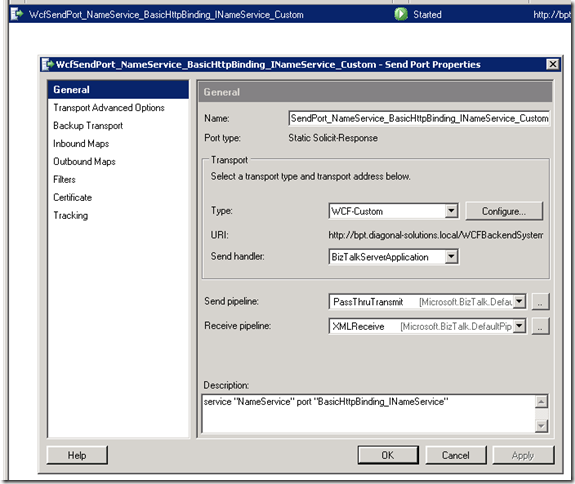
- Select configure, select import (on the import/export tab).
- Import the xml config file created above.
- You should see the following binding details , ok these

- Run your tests, you should get all greens.

- The output of the biztalk tests should be something like :

- As you can see we are running tests as wisdomv6 but all the checks return the user that we are impersonating.
What have we just done?
In simple terms we have extended WCF to allow it to impersonate a user before it calls the endpoint. We have configure our domain to allow impersonation. We have passed calling user to the WCF EndPoint in BizTalk.


